
- 36Vegas App UK: iPhone, iPad and Mobile Browser Access
- Choose How to Access 36Vegas on Mobile
- Download the 36Vegas App for iPhone or iPad
- Check Compatibility Before Installing
- Use 36Vegas on Android Through Your Browser
- Understand APK Files and Website Shortcuts
- Register or Log In on Your Phone
- Return With Your Existing Account
- Browse Casino Games and Sports on a Smaller Screen
- Handle Mobile Payments and Account Checks Carefully
- Keep Verification Separate From Installation
- Read Promotions Fully on Mobile
- Manage Updates, Permissions and Privacy
- Resolve Common Mobile Access Problems
- Keep Mobile Account Access Under Your Control
36Vegas App UK: iPhone, iPad and Mobile Browser Access
The 36Vegas app is free to download from the UK App Store for iPhone and iPad. Published by 36Gaming Ltd., it brings casino games and live sports betting to Apple devices. Mobile browser access provides another way to use 36Vegas, including on Android phones, without installing a separate application.
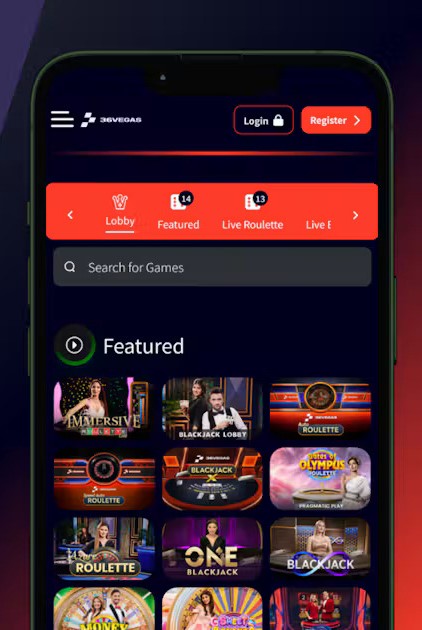
For an iPhone or iPad, start with the App Store listing and check your device’s compatibility. For browser access, use the player website linked from the app’s developer information. Keep your existing account details ready when moving between devices.
Choose How to Access 36Vegas on Mobile
An installed app and a mobile website have different setup requirements. The app is downloaded through Apple’s store and updated there, while browser access opens the player website directly.
| Access option | How it works | Practical consideration |
|---|---|---|
| iPhone app | Install 36Vegas through the UK App Store | Requires iOS 15.6 or later |
| iPad app | Install the same app on a compatible tablet | Requires iPadOS 15.6 or later |
| Mobile browser | Open the 36Vegas player website in your browser | No app installation is needed |
| Browser shortcut | Save the player website for easier return visits | A shortcut opens the website rather than installing the App Store app |
Choose the route that suits your device and how you prefer to manage updates. Neither installing an app nor saving a shortcut replaces registration, account checks or the conditions attached to real-money play.
Download the 36Vegas App for iPhone or iPad
Use the 36Vegas UK App Store listing to identify the correct application. Check the provider name, 36Gaming Ltd., rather than relying solely on an icon or a similar casino name.
To install:
- Open the listing on your iPhone or iPad.
- Compare the compatibility requirements with your device’s operating system.
- Start the download through the App Store and complete any Apple authentication requested.
- Allow installation to finish before opening the app.
- Sign in with your existing player credentials, or follow the registration instructions if you are a new customer.
- Review any permission requests before making your choices.
The download itself is free. That does not make real-money wagers free, and installation does not automatically qualify an account for a promotional reward.
Check Compatibility Before Installing
You can find your operating system version in your device settings. Compare it with the requirements in the table above before starting the download.
Keep some free storage beyond the space occupied by the application itself. Installation, updates and temporary data can require additional room. The App Store shows the current download information, which is more useful than a file-size figure copied from an older guide.
Use 36Vegas on Android Through Your Browser
For 36Vegas Android access, open the player website in a current mobile browser. This route avoids the need to download an installation file and lets you begin with the website’s account access options.
Allow the page to load fully before entering credentials or opening a game. If the on-screen keyboard covers part of a form, close it temporarily to inspect the remaining fields and any confirmation text.
Understand APK Files and Website Shortcuts
An APK is an Android application installation package. It is different from an App Store download, a website bookmark or a home-screen shortcut.
Use download links supplied through the operator’s own channels when choosing installation software. A file hosted on an unrelated download directory should not be treated as official simply because its name includes 36Vegas.
For convenient browser access, save a bookmark after confirming the player address. Where your browser offers a home-screen shortcut, it can make return visits easier, but it does not establish that you have installed a native Android app.
Register or Log In on Your Phone
New customers should complete registration through the player service with accurate personal information. The operator states that its services are for customers in Great Britain aged 18 or over. Device compatibility and an App Store download are separate from account eligibility.
Keep your registration details consistent with the information on documents you may need for verification. Correcting a mistyped address or name at the outset is easier than discovering the discrepancy during a later account check.
The 36Vegas sign-up guide explains the registration topic in more detail. It is a guide page; enter personal details in the player registration form.
Return With Your Existing Account
When switching from desktop to mobile, use your existing account credentials. Installing the app is not a reason to register again.
Before submitting a mobile login form, check that autofill has selected the correct saved entry. A password manager may retain an earlier password after you have changed it elsewhere. Mobile keyboards can also introduce unwanted spaces into an account identifier.
If you cannot remember your password, use the recovery instructions provided by the player service. The 36Vegas login guide covers account access separately.
Browse Casino Games and Sports on a Smaller Screen
The app combines slots, live dealer games, classic table games and sports betting. Its listed features also include betting history, live scores and statistics.
Before placing a wager, take a moment to inspect the information that matters on a smaller display. For casino games, read the rules and confirm the selected stake. For sports bets, review the event, market, selection and odds before submitting.
A useful mobile checklist is:
- Confirm the stake shown before each wager.
- Read the game rules rather than relying on the thumbnail.
- Review every selection in a multiple bet.
- Keep the balance and confirmation message visible.
- Check recorded activity after an interrupted session.
- Pause if a screen is still loading or its controls are unclear.
For live dealer games, a stable connection matters because the video stream and betting interface must remain usable together. A moving video does not, by itself, confirm that a bet has been accepted.
Handle Mobile Payments and Account Checks Carefully
The app includes deposit and withdrawal functionality. Before submitting either type of transaction, read the options and conditions displayed for your account.
A method offered for depositing should not automatically be assumed to support withdrawals. Check the transaction type, amount, any displayed limits and the destination before confirming. Use payment details belonging to you.
After submission, look for the recorded transaction status. If a page pauses or an app closes, establish whether the request was accepted before trying again. Repeating a payment because its confirmation was missed can create an avoidable duplicate.
Keep Verification Separate From Installation
Installing the 36Vegas app confirms that the software is on your device. It does not complete identity, age or payment ownership checks.
If documents are requested, follow the submission instructions within the player service. Make sure images are readable and show the required information. Avoid sending unsolicited documents through an enquiry form or ordinary message when a specific submission route has been provided.
Read Promotions Fully on Mobile
A promotional banner is an introduction to an offer. Open the full conditions before deciding whether to participate, especially when the mobile display shortens the headline or hides details below the initial view.
The conditions that affect your next action include eligibility, qualifying activity, eligible games, wagering requirements and expiry. Also establish whether accepting one offer prevents participation in another.
Downloading the app should not be treated as automatic bonus activation. Follow the instructions attached to the individual promotion. If promotional funds or free-spin winnings carry wagering conditions, distinguish them from cash that is eligible for withdrawal.
Notifications can draw attention to an offer, but they do not replace its full terms. Read those conditions within the player service before taking action.
Manage Updates, Permissions and Privacy
Update the installed app through the App Store. For browser access, keep the browser and device operating system current. These are separate maintenance tasks: updating one does not update the others.
Review permission requests in context. Consider which feature you are using and why it needs access before agreeing. Device settings also let you review notification preferences and control what appears on the lock screen.
The App Store privacy disclosure lists categories that may be linked to a user, including financial and contact information, identifiers, usage data and diagnostics. Read the linked developer privacy policy for the fuller explanation of data handling.
Resolve Common Mobile Access Problems
Start by identifying which part of the process is affected. A rejected password, an installation issue and a game interruption require different checks.
| What happens | First check | Useful next action |
|---|---|---|
| Installation does not finish | Connection, free storage and device compatibility | Retry through the App Store after addressing the cause |
| The app closes unexpectedly | App and operating system updates | Update, reopen and record when the issue occurs |
| Login details are rejected | Account identifier, password and autofill | Correct the entry or follow account recovery |
| A browser form displays incorrectly | Browser version, zoom and stored site data | Reload, then try another current browser |
| A game freezes after a wager | Recorded activity and balance | Establish whether the wager was accepted before continuing |
| Payment confirmation is unclear | Transaction history and payment account | Confirm the status before submitting another request |
Make one change at a time so you can tell which action helped. Before clearing browser cookies or reinstalling software, make sure you can access your credentials and registered mailbox.
For an unresolved issue, reach support through the player service. Include the device model, operating system, app or browser version, approximate time and exact error text. A screenshot can help, provided it does not expose passwords, recovery codes or complete payment details.
Keep Mobile Account Access Under Your Control
Use a device lock and a unique account password. On a shared phone or tablet, avoid leaving a player session open or saving credentials where another person can use them.
Confirm the destination before following login or download links from messages. The App Store provider details and its linked developer website give you a reference for identifying the player service. Editorial guides can explain a process, but personal details, credentials and payments belong in the player service itself.
Before beginning a session, choose an affordable spending budget and a stopping point. Keep notifications consistent with those choices, and take a break when play exceeds the time or money you intended to spend.
Download the 36Vegas Casino App Now
Android APK + iOS PWA - instant setup for UK players. Claim your mobile bonus on first login.
18+. T&Cs apply. UK players only. Please gamble responsibly.

Selected Bonuses October 2026